Exporting your data

The export is a ZIP of your group's data, downloadable at any time, importable into a self-hosted MeetAgain. It exists so that staying is a choice rather than a consequence.

The Export tab

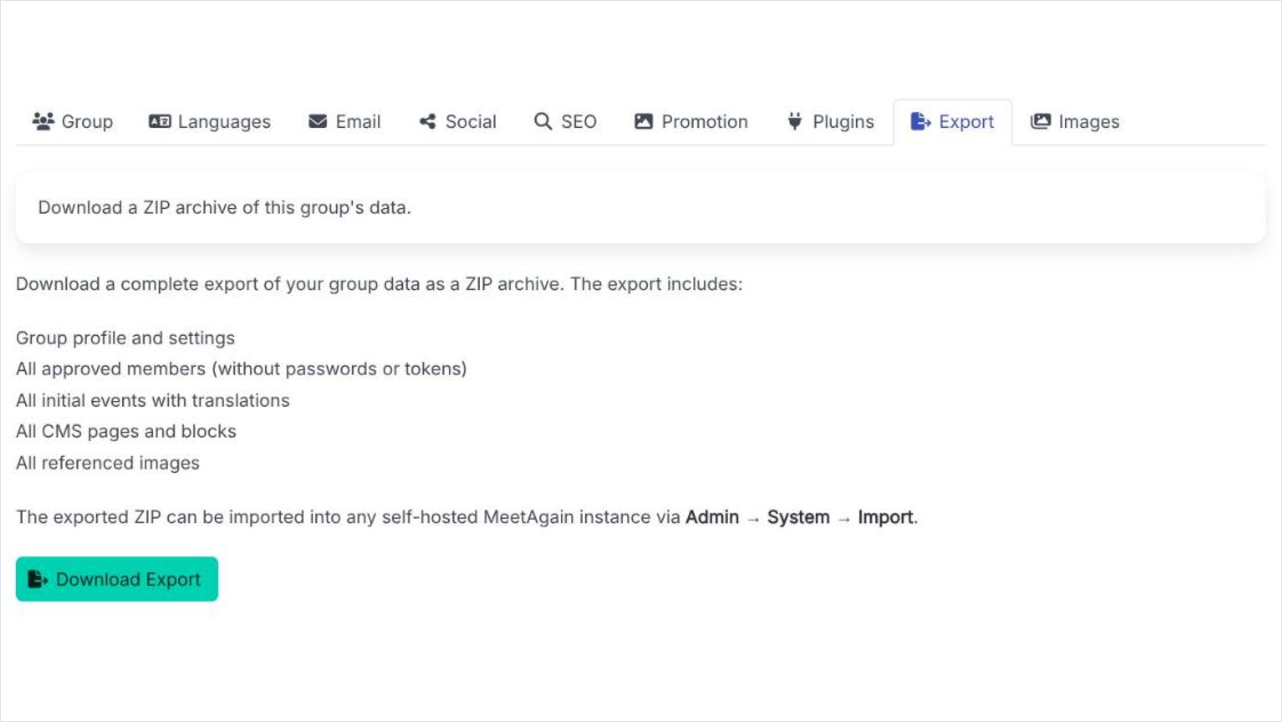
Export in the group settings is a single button and a list of what comes out. There is nothing to configure and no waiting - it builds the archive and hands it to you. It is worth taking one occasionally even if you have no intention of leaving; a copy of your own content is a reasonable thing to have.

The Export tab, listing what the archive contains above the Download Export button.
The Export tab. One button, and a list of exactly what is in the file.

What the archive contains

Group profile and settings
The name, description, tags, visibility and the rest of the Group tab.
All approved members
The member list, without passwords or tokens. Enough to know who was in the group, not enough to sign in as them.
All initial events with translations
The events, in every language they were written in. Initial events are the ones you created; the occurrences a recurrence rule generated are rebuilt from the rule.
All CMS pages and blocks
The whole site: every page, every block, in every language.
All referenced images
The image files themselves, not just links to them. This is what makes the archive large and also what makes it usable.

Taking an export and using it

  1. 1

    Press Download Export

    The ZIP is built and downloaded. Nothing changes in the group and nobody is notified.

  2. 2

    Keep it somewhere real

    A copy on your own machine or in your own storage. An export sitting in a downloads folder is not a backup.

  3. 3

    Import it if you ever move

    A self-hosted MeetAgain takes the archive under Admin, System, Import. The core is open source, so a self-hosted instance is a real option rather than a theoretical one.

Export before anything irreversible

Cleaning up orphaned languages, deleting a series of events, handing the group to someone else - all of them are easier to be relaxed about with a fresh archive on disk. It costs one click.