Your profile is the page other members see when they click your name: your picture, what you call yourself, and a short bio. It is also where you choose the language the site greets you in.
Opening your profile
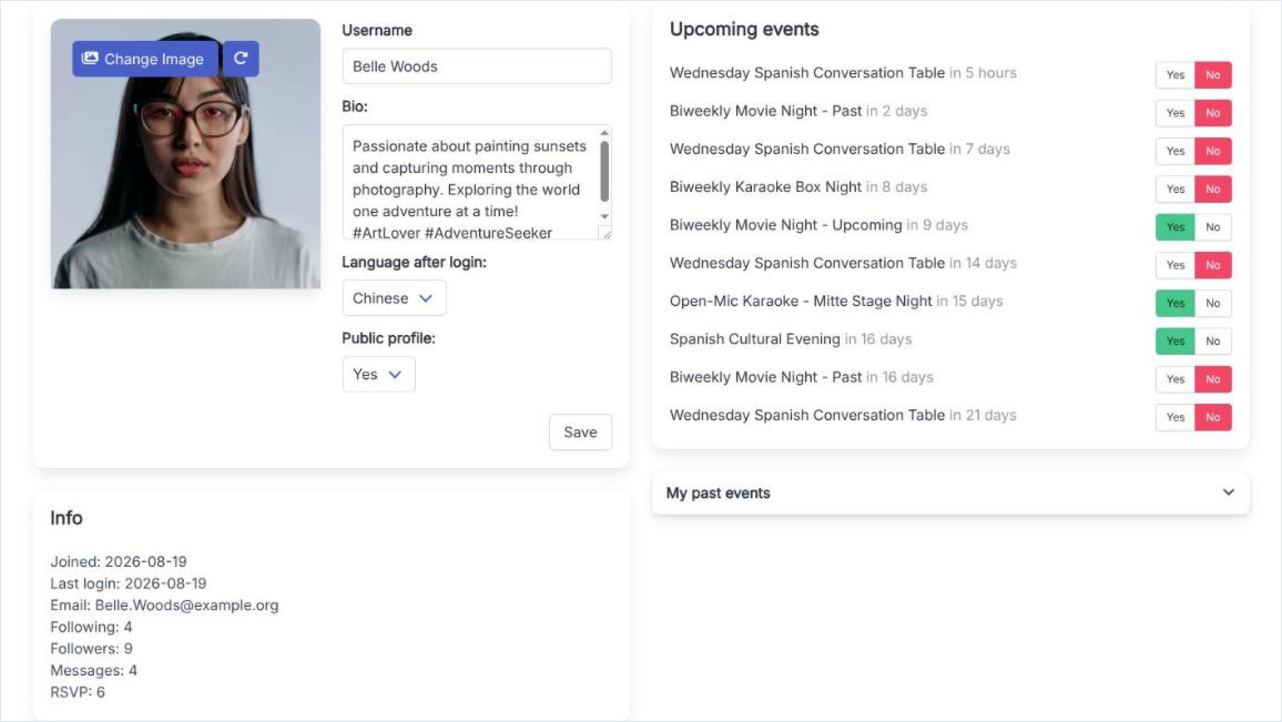
Click your name in the top bar and choose My profile. The left column holds the form you edit, with the Info summary under it; the right column lists the events you have coming up. Nothing on the form is saved until you press Save.
My profile: the editable form on the left, your upcoming events on the right.
The fields you can edit
Profile picture
An image up to 10 MB, best square. It becomes your avatar everywhere - member directory, attendee lists, comments and messages - and it can be rotated after uploading.
Username
The name shown next to everything you do, up to 64 characters. Changing it is recorded in your activity stream, so the people who follow you see the old name and the new one.
Bio:
A free-text paragraph about yourself, shown on your profile page. Leave it empty and nothing is shown in its place.
Language after login:
The language you get on every visit once you are signed in. The flag in the top bar changes the language of the visit you are in; this is the setting that sticks.
Public profile:
Yes or No, and the same value as the first toggle in the Privacy box. Privacy and visibility explains what it changes.
Info and your events
Under the form, Info lists Joined, Last login and Email, then counters for Following, Followers, Messages and RSVP. A Blocked count joins them only once you have blocked somebody. The right column is Upcoming events, each row carrying Yes and No buttons so you can answer without opening the event, and under it My past events, collapsed. None of it is editable.
Two places, one setting
Public profile on this form and the first toggle under Settings and Privacy are the same value. Change either one and the other follows.