Notifications and emails

Two different things are called notifications here. The bell in the top bar collects what happened on the site; the Settings box decides which of it also reaches your inbox.

The bell and the notifications page

The bell in the top bar carries a count when something is waiting - unread messages, and for organizers things like new support requests or images missing their alt text. Following it opens the notifications page, which lists them in full and simply says there are no new notifications when nothing is pending.
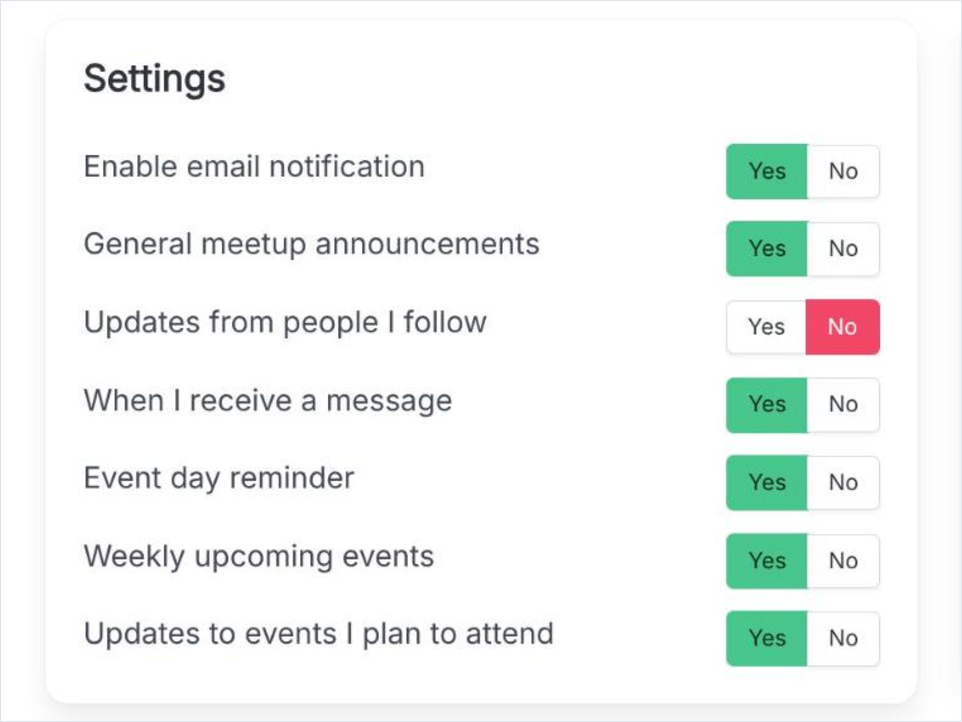
The Settings box on the settings page, with the master email toggle at the top and the individual email toggles listed below it.
Settings: the master switch first, then one toggle per kind of email.

The email toggles

Enable email notification
The master switch. With it off no notification email is sent at all, and the toggles below it are hidden rather than reset.
General meetup announcements
Announcements an organizer sends to the whole group.
Updates from people I follow
Activity from the people in your Following list - the same stream that fills My activities.
When I receive a message
An email when another member writes to you, so a message does not sit unread until your next visit.
Event day reminder
A reminder on the day of an event you said you would attend.
Weekly upcoming events
One digest a week of what is coming up.
Updates to events I plan to attend
An email when an event you RSVPed to changes - a new time, a new place, or a cancellation.

The master switch does not lose your choices

The individual toggles keep their values while the master switch is off; they are only hidden. Switch it back on and the same set of emails resumes.